KB Home
KB Home
Login
Time Zone
KB Home
Appointments
Create Appointment
Create Note From Appointment
Business Settings
Add / Edit Practice Locations
Business Agreement (BAA)
Business Name & Details
Clients
Adding a Client
Adding Client Details
Ask AI
Change Client Code (Resuscitation) Status
Change Client Status
Download All Data
Download Single Client
Notes
Add Addendum
Adding or Editing CPT (Procedure/Visit) Codes
Create a Note
Delete a Note
Extract Problems from Medications
How to create a Quick Note
ICD Codes
Optimizing Note Generation
Recover Deleted Note
Signing a Note
Site Settings
Alerts
Custom Settings
Dismissal Presets
Plan Presets (Set Default)
Reminders
Time Zone
Units of Measure
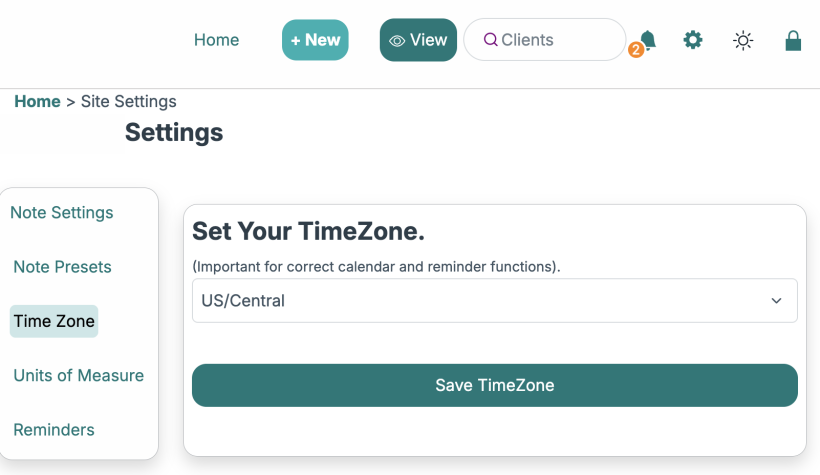
Setting your time zone is easy in the "
Site Settings
", click "
Time Zone
" in the navigation area and use the pulldown menu to select your main timezone, then click "Save TimeZone".
EHRAccess Reviews
EHRAccess Reviews
Home
Get Started
Pricing
FAQs
Knowledge Base
Features
Contact
Login
Client Portal
© 2025
EHRAccess.com
All Rights Reserved
r.text()) .then(html => { termsHtml = html; termsLoaded = true; }); } " style="cursor:pointer;text-decoration:underline;" class="">Terms of Service
Close
|
r.text()) .then(html => { privacyHtml = html; privacyLoaded = true; }); } " style="cursor:pointer;text-decoration:underline;" class="">Privacy Policy
Close